 I used the circle tool to devise another puff. It is green with a white boarder to follow my house style. It mentions the final trailer of 'Star Wars VIII' which I predicted would be released at the time of this issue as it is coming out in December. I used exclamation marks to make it appear exciting.
Monday, 24 April 2017
Creating My Cover Page-Part 8 (Circle Puff)
I used the circle tool to devise another puff. It is green with a white boarder to follow my house style. It mentions the final trailer of 'Star Wars VIII' which I predicted would be released at the time of this issue as it is coming out in December. I used exclamation marks to make it appear exciting.

Creating My Cover Page-Part 7 (Text at the Bottom)
 At the bottom of my cover page, I placed another banner. It uses 'Empire's' conventional, italic 'Plus' and also makes reference to more films that are being released at the end of 2017 including 'Kingsman' and 'Insidious'. It talks of an interview and a review which are commonly found in magazines. It still follows my green, white colour scheme to maintain the house style.
Creating My Cover Page-Part 6 (Text at Top)
 At the top of my cover page is a banner that
informs a reader of the contents within the magazine. It references a countdown
of 'The 50 greatest horror movie moments' and mentions many famous horror films
like 'Alien' 'Scream' and 'Friday the 13th'. This was inspired by the
'Independence Day Resurgence' cover of 'Empire' magazine where its cover
mentions a countdown of the 'The 50 greatest sci-fi moments'. I adapted this to
'horror movie moments' to suit the genre of my film and the October/Halloween
release date of the issue.
At the top of my cover page is a banner that
informs a reader of the contents within the magazine. It references a countdown
of 'The 50 greatest horror movie moments' and mentions many famous horror films
like 'Alien' 'Scream' and 'Friday the 13th'. This was inspired by the
'Independence Day Resurgence' cover of 'Empire' magazine where its cover
mentions a countdown of the 'The 50 greatest sci-fi moments'. I adapted this to
'horror movie moments' to suit the genre of my film and the October/Halloween
release date of the issue.
Creating My Cover Page-Part 5 (Barcode and Puff)
 Almost every magazine has a barcode on its cover as it is necessary for retail purposes so I placed a barcode onto my cover page. Underneath the barcode is a puff that informs of the magazine's contents. From my research, I discovered that Thor: Rangnorok is set for release in November and therefore assumed that a trailer would be released in October. I made reference to this in the puff where the subtitle is 'Thor Preview'. It is also due to be the final Marvel product of 2017 and I made reference to this in the text below my subtitle. I also found that 'Jumanji' is being released at the end of 2017 and therefore included this in the puff too. The subtitles in green text due to their importance with further provided information being in white. This follows my colour scheme of green and white.
Creating My Cover Page-Part 4 (Film Title)
 Over the main image, I placed the title of my film. This is the largest font on the page as the magazine's focus is upon 'Coulrophobia'. Below it is a phrase that compliments the title which reads 'The most suspenseful film of the year!'. It is underlined to increase its importance and the exclamation mark constructs a sense of excitement. These subtitles are common among 'Empire' cover pages as they provide further information towards the film they are about. The word 'most' is a buzz word that derives a reader's attention. All of this text is in the colour green as green and white is the house style I've decided upon. Green is commonly used to represent horror and evil.
Creating My Cover Page-Part 3 (Taking Pictures and Adding to Photoshop)
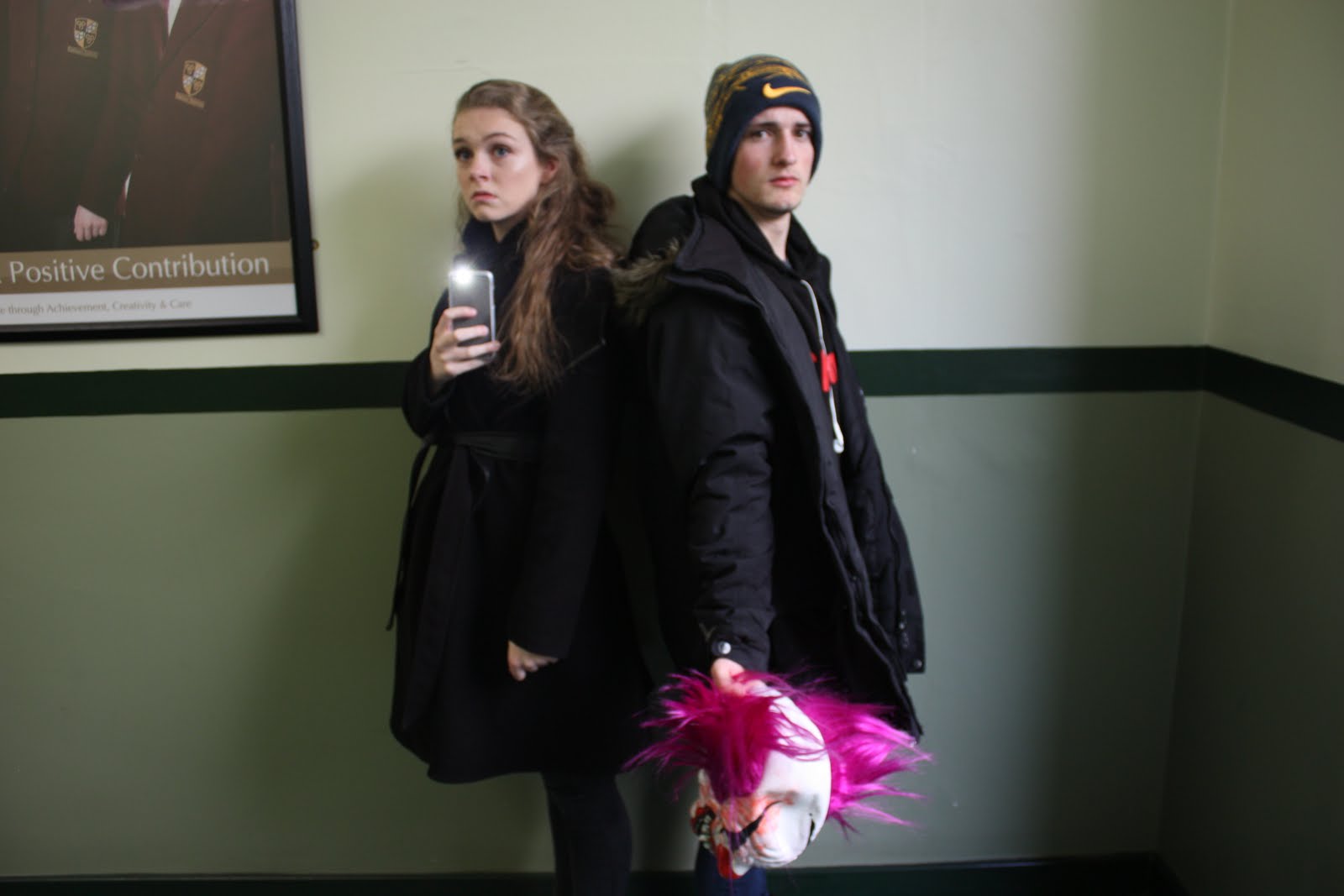

For my magazine's cover page, I required a medium close up shot of my actors. For convenience, I took this shot in school. Despite the indoor location, there was a large window behind my and therefore, natural sunlight shone on my actors. I experimented with two possible shots. One consisted of my actors stood back to back whilst fearfully looking at the camera. I directed Lydia to her phone with its torch light lit whilst Danny held the clown mask. However, due to the bright lighting, the torch did not work effectively. Another shot I directed echoes an aspect of my trailer where the two are backing away from the camera whilst Danny is in the forefront, protectively outstretching his arm. He holds the clown mask to allude to the villain despite its lack of appearance. I used the eraser tool to remove the background. I also found that Danny was wearing earphones in the shot but this problem was simply solved through the use of the of the spot removal tool to realistically remove the earphones. I made the image of my actors protrude over the 'Empire' logo as this is a convention of 'Empire' magazines.


Creating My Cover Page-Part 2 (Empire Logo)
 Next, I implemented an image of 'Empire's' logo. This was initially red in colour and therefore clashed against my background. So, I used the fill tool on photoshop to make the logo a bight white colour which was much more clear than the original red logo. I used the text tool to add the issue date (October 2017), website address ('empireonline.com') and the price ('£4.50, $9.99') and placed this between the points of the letter 'M'. A convention of 'Empire' magazine is to place this information within the letter 'M' and therefore, I replicated this for my own cover page.
Subscribe to:
Posts (Atom)